
Help Center · Stories and clips
Creating clips with AI
In the editor you can have pictures, videos and sound generated from a description. Every generation costs credits, including a second attempt with the same text. The feature comes with the Team plan and above.
Where to find it
- Library → Create a clip → Create with AI: you describe the background in one sentence and choose Picture (three drafts to choose from; you can make a video of the chosen one later) or Video (eight seconds straight from the description). With a picture you can order a sound along with it; it is generated only once the picture is there. You set the clip's length under the prompt; Repeat the video lets the clip run longer than the video. Before you click Create you see what it costs. Skip takes you into the editor without AI.
- Background → AI: a still picture or a video from your description.
- Music → AI: a soundtrack or an ambience from your description, without a picture. This also lets you add sound to clips you uploaded.
While the AI works, the stage shows a field of light, a small indicator at the top centre shows the kind and the time elapsed, and you can keep working. A video takes about two minutes, a picture about fifteen seconds, a sound about thirty. The result lands in the clip by itself, and a note says where. While a video is being made, the background accepts no other picture; text, tools and music stay free.
How to go about it
- Describe what should be seen or heard. Short and concrete beats long.
- Choose a Style: Cinematic, Documentary, Illustration, Product or Brand. "Brand" adds your colours, your font and your organisation's description from the settings. Under Prompt to the provider you see the finished text and can change it.
- Generate draft delivers three still pictures to choose from, 3 credits each (9 in total). Pick one. If you like it, Make a video of it turns it into a video of 4, 6 or 8 seconds, at 4 credits per second. 4 and 6 seconds come in 720p, 8 seconds in 1080p. Every video is a new generation.
- For a soundtrack you choose what it should do (Calm in the background, Drives forward, Factual and neutral, Upbeat, Ambience only) and the length (10 to 90 seconds or As long as the clip, 1 credit per 10 seconds, at least 4). The soundtrack lands in the Music tab and can be trimmed there like any other. It is also available under Uploads for other clips. An AI video brings its own sound; you add music afterwards in the Music tab.
- Every result goes straight onto the stage. Earlier versions stay under Versions; Use brings one back. Under Background → AI → Already generated are all AI results of your organisation; a tap puts one in.
- If an AI video is the background, it stands at the top of the AI tab with the Improve button. It opens a window with the field What should be better?; the second attempt keeps the length, source picture and description of the first and costs like a new generation.
What is not allowed
No real people, no third-party brands or logos, no named artists, bands or songs, not even as a comparison. Such descriptions are rejected before generation.
Credits
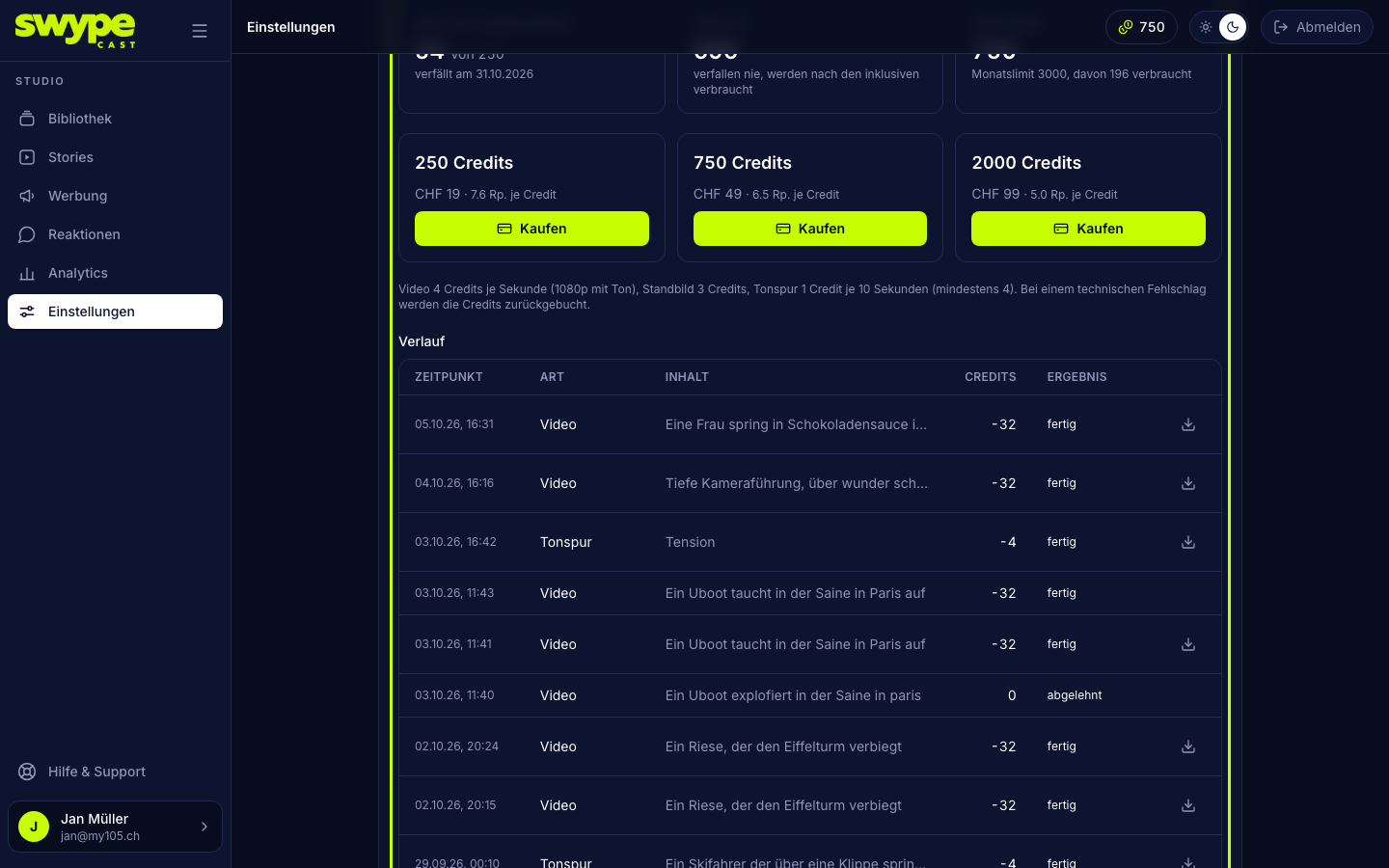
Under Settings → AI credits (or via the credit counter at the top right of the studio) you see your balance: the month's included credits (they expire at the end of the month) and purchased ones (they never expire and are used only after the included ones). How many credits your plan includes per month is shown under Settings → Subscription.
That is also where admins buy packs: 250 credits for CHF 19, 750 for CHF 49, 2,000 for CHF 99. The history lists every generation and every purchase with time, kind, content, credits and outcome. You can also download finished results there.
Labelling and rights
In the SwypeCast app a note before the first generation tells you that your description and your picture go to Google (picture and video) and ElevenLabs (sound) and are checked by Anthropic for disallowed content first. Generated clips carry the AI badge in the library and the note AI-generated below the title in the player. This note cannot be switched off: in the EU, realistic-looking AI content must be labelled, and we take care of that for you. Results are not exclusive; a similar picture can come up for someone else. Content generated purely from a description usually does not attract copyright.
Rate a result under Versions with Good or Not good. What was not good feeds into your organisation's next generations as a hint.