Help Center · Stories and clips
Tools on a clip
Tools are interactive elements on a clip: a vote, a poll, an open question, a barometer, a countdown, a link, a place or a prize draw. In the player they lie over the video as a layer of their own and are never rendered into the video.
Where to find it
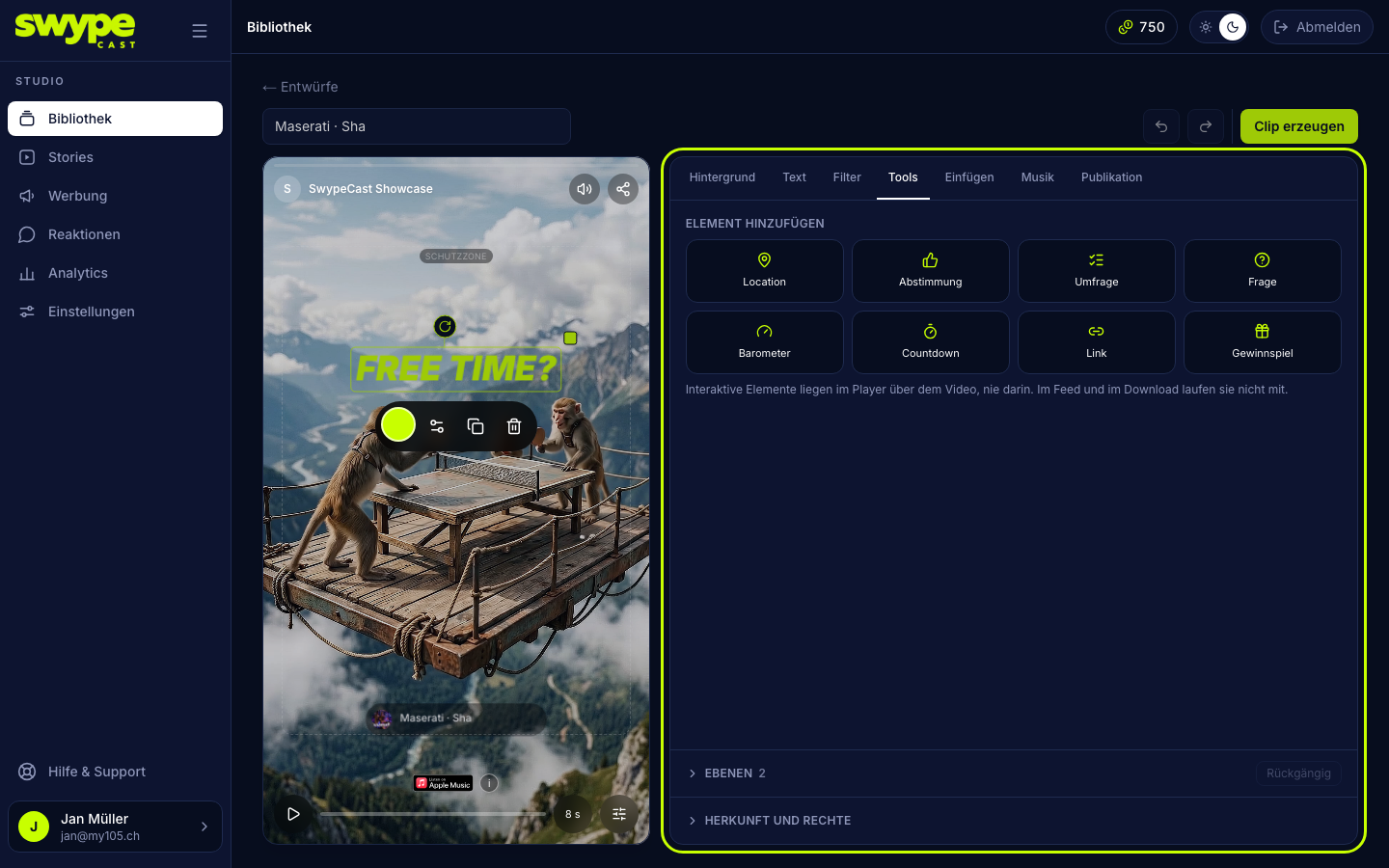
In the editor, in the Tools tab. When a tool is selected, its fields stand at the top; below that is the grid Add an element with all eight tools.
Adding a tool
- Open a clip in the editor and switch to the Tools tab.
- Click a tool in the grid. It appears on the stage at its usual place and is selected right away.
- Fill in the fields. If something is missing, Create the clip does not start yet: a click lists what is missing, and Go to field takes you straight there.
- Drag the tool into place on the stage. The grip above the frame turns it, the square at the top right corner changes its size (type, buttons and spacing grow with it). The toolbar under the tool holds settings, duplicate and delete, and, for tools with a coloured surface, the colour dot at the far left. A double click on a tool opens its settings.
- Under Font you choose a font of your own. Leaving it empty means: the organisation's font from Settings → Player.
The eight tools
- Vote: a question with yes and no. Under Yes means and No means you label the two answers.
- Poll: a question with two to four answers.
- Question: an open question; viewers type their answer. With Show approved answers under the question, other viewers see two answers right at the element and the rest opens as a list.
- Barometer: a slider with an emoji. You pick the emoji and the starting position.
- Countdown: counts down to a moment, with a label and three designs (Pill, Blocks, Bold). For Bold you choose the colour of the digits.
- Link: a button with a label and an address.
- Location: a place with name and address. A tap opens it in the maps app.
- Prize draw: a button that opens a form; the entries land under Reactions → Contests, see Prize draw on a clip.
For vote, poll and barometer you decide with Show the result after voting whether viewers see the result.
The colour of a tool
Link, prize draw, question, vote, poll and barometer have a surface that carries a colour: the button, the two answers, the bars, the slider. For those the tab shows the field Colour of the element and the toolbar the colour dot. Accent colour means your organisation's key colour from Settings → Player. Location and countdown have nothing to colour; the Bold countdown has its own colour for the digits instead.
Plans and limits
- Link, countdown, vote and poll with Team and above (like the editor itself).
- Question, barometer, location and prize draw with Pro and above.
- At most three tools per clip. More would not be usable on a phone.
A tool your subscription does not include is dimmed in the grid.
What viewers see
Vote, poll, barometer, question and prize draw wait for an answer: the clip runs a second time so the question does not slip by unanswered, then the story moves on. Countdown, link and location never hold the clip. Every viewer answers once per tool; a second answer changes the first. An element that grows with its content (a poll with four answers, a question with answers) always stays inside the safe zone in the player; it moves up if it has to.
Where the results go
- Votes, polls and barometers are under Analytics → Votes, with CSV export.
- Answers to a question go through moderation like comments. You find them under Reactions in the Inbox and, while they wait for approval, under Moderation.
- Entries of a prize draw are under Reactions → Contests.