Help Center · Team and account
Set rights per role
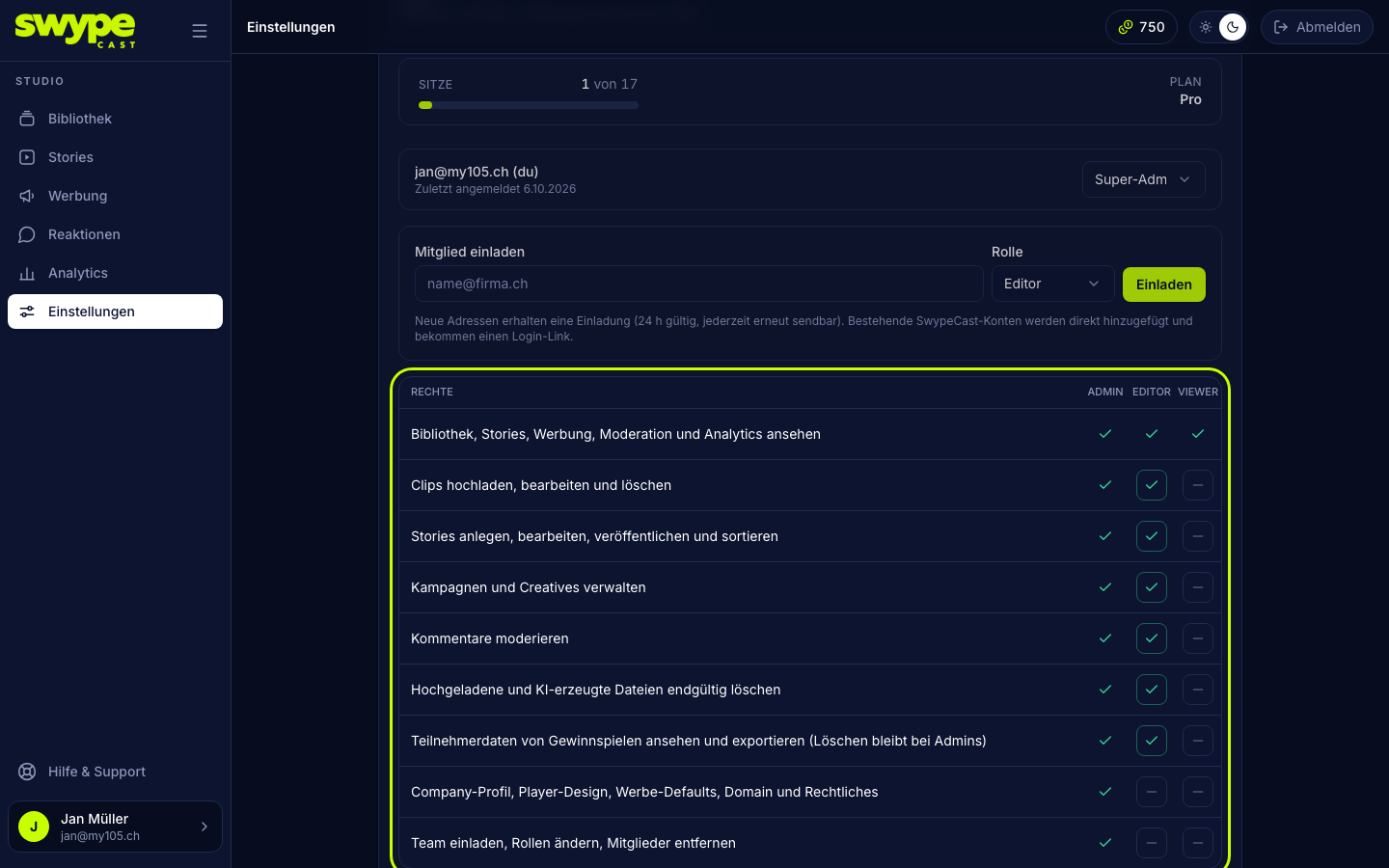
What editors and viewers may do is up to you, per organisation, in the rights matrix under Settings → Team (below the member list).
The rights
- View: see library, stories, advertising, reactions and analytics (always on).
- Clips: upload, edit, delete.
- Stories: create, edit, publish and reorder.
- Advertising: manage campaigns, creatives and advertisers.
- Moderation: approve, hide, delete and answer comments, mark entries under Reactions as done.
- Delete files: permanently delete uploaded and AI-generated files under Mine in the editor. AI material may be deleted even when it is in a story; the dialog then names the stories affected.
- Prize draws: view and export entrant data under Reactions → Contests. Deleting stays with admins.
- Organisation: profile, player design, advertising settings, moderation rules, domain and legal.
- Team: invite members, change roles, remove members.
Defaults
- Editor: view, clips, stories, advertising, moderation, delete files and prize draws.
- Viewer: view only.
- Admin and super admin: everything, cannot be changed.
Change
Click the field for Editor or Viewer in the matrix to switch a right on or off. The change applies immediately, also for people who are signed in right now. Rights are checked not only in the studio but also in the database. If someone lacks a right, the studio tells them which one at that spot.
Was this helpful?